Variables
In this tab, the variables that will be used in the integration flow are configured. Variables are objects capable of holding and representing a value or expression during the flow's runtime.
Procedure
To add a variable, click the "Add" button. Fill in the fields:
- Variable Name;
- Description;
- Store in the database: whether the variable should be stored internally, in the Low Code data model.
- Return Variable: whether the variable should be included in the output JSON object returned at the end of the flow execution.
- Value List: If the variable contains a list of values.
- Mandatory input variable in execution: this option should be selected if the flow execution depends on the existence of the variable before the start of execution.
- Variable Type
- Initial variable value, which can be a constant or a value returned by script execution.
✏️ Note: Internal storage means writing directly to the database. Depending on the flow usage, it may be an option not to save to the bank.
In the example below, we have a flow that will fetch the address from the zip code:
Even though the store in bank option is not selected for the zip code, it will be saved in the bank when the fields are auto-populated and the record is saved.
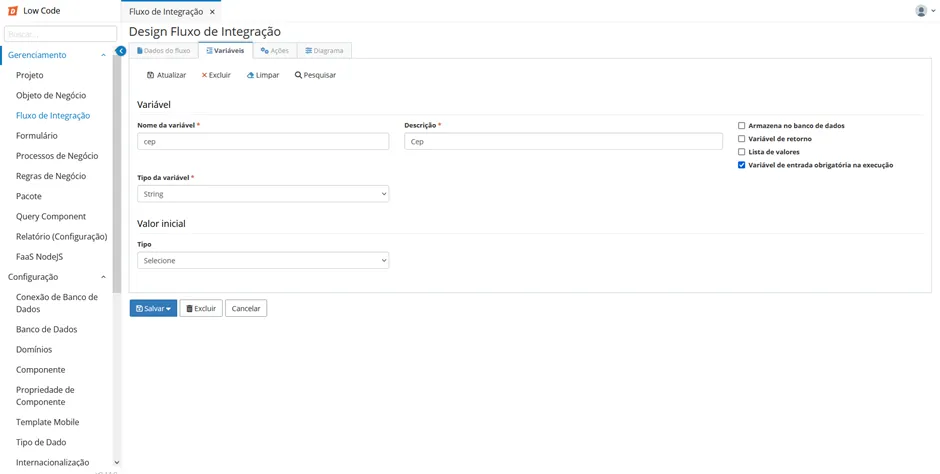
Click the "Save" button to include the variable.
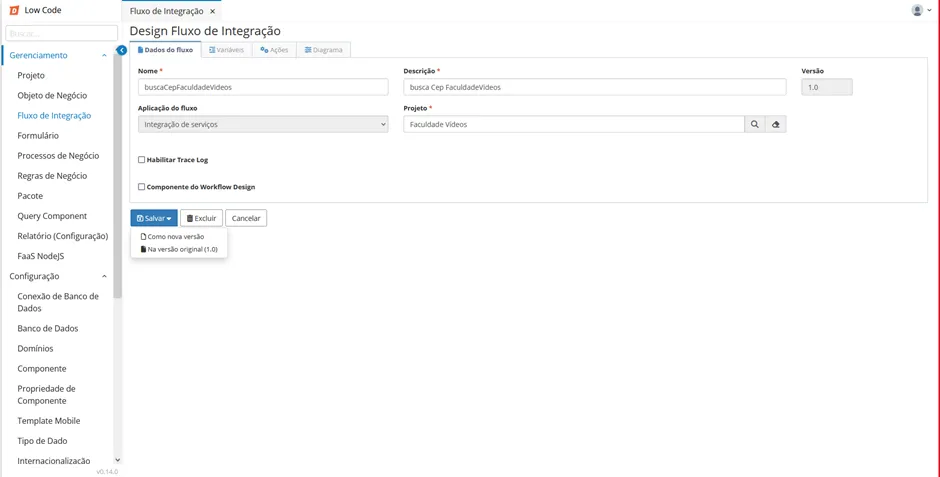
⚠ Attention! To permanently save the changes, click on the "Save" button in the Flow Data tab.
Glossary
Variable
A variable is a symbolic name or identifier that references a location in memory where a specific value can be stored. It can contain different types of data, such as numbers, text, dates, booleans, and others. Variables allow developers to assign values to them and use these values in various parts of the code for calculations, data manipulation, and decision-making.
Return Variable
A variable that will return a response, where the function is an intermediate step in some kind of calculation.
Input Variable
A variable into which a value must be entered, such as the ZIP code, for the return variable "address" to return some value.
Value List
A list with values assigned to its sequence.
JSON
JSON is a way of representing structured data in a simple text format. It uses a syntax based on key-value pairs to describe objects and arrays, allowing the organization and storage of information in a hierarchical manner. JSON is language-independent, meaning it can be read and interpreted by a wide variety of programming languages.