Teams and ART
On the Times and ART screen, you can create teams and Agile Release Trains (ARTs) to streamline the organization of your projects.
To access the screen, click on the Agile Work Management lightning bolt icon in the left sidebar menu, and then click on the Times and ART tab:
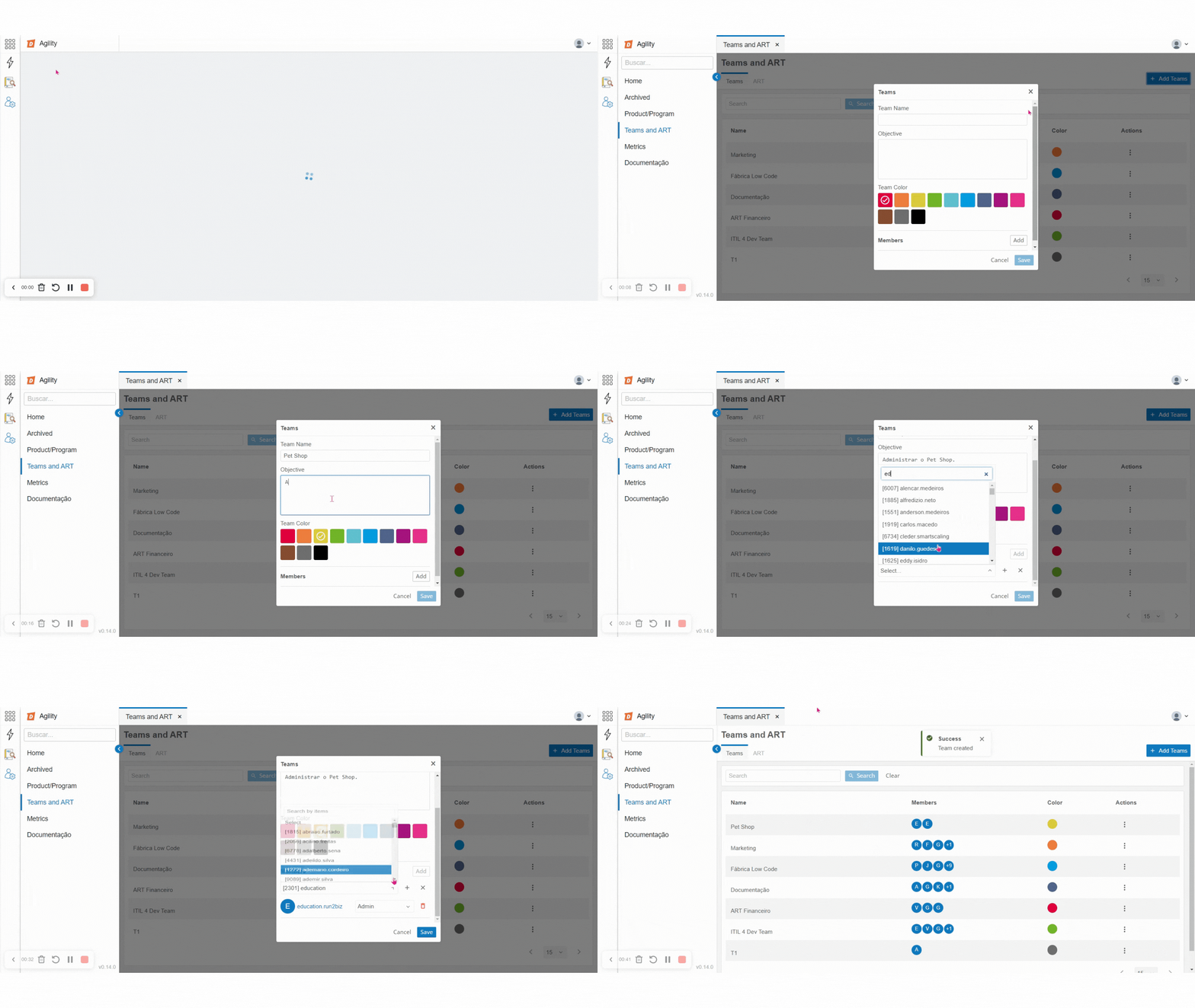
The main screen is divided into two tabs: Times and ART. At the top of the screen, there is a search box that allows you to search by name. The search will be performed for both Teams and ARTs.
Teams
The teams' tab displays a table with the registered teams, an option to add a new team, and some information divided into columns.

The creation button displays a pop-up window with some information to be filled in:
- Team Name;
- Team Objective;
- Team Color;
- Members: Choose one or more members for the team;
- When selecting a member, the option to remove the added member will be presented, as well as the option to select the member's profile type;
- Cancel or Save
Table

The presented table organizes the information in the following columns:
- Team Name;
- Team Members;
- Team Colors;
- Actions: Clicking on the icon displays an Edit button. This button allows editing the name, objective, color, members, and profile of the team. Currently, the members can be of the administrator or member type.
⚠️ Attention! Only the user logged in with an administrator profile can make this profile change.
ART (Agile Release Train)
The ART tab displays a table with the registered ARTs, an option to add a new ART, and some information divided into columns.

The creation button displays a pop-up window with some information to be filled in:
- ART Name;
- Add Team;
- Add Member;
- More than one team and more than one member can be added;
- Only active teams not linked to another ART will be presented;
- Cancel or Save;

The presented table organizes the information in the following columns:
- ART Name;
- Teams for each ART;
- Members for each ART;
- Actions: Clicking on the icon displays an Edit button. This button allows editing the name, members, and teams of the ART.