Implement Builder Solution
Implementation Process
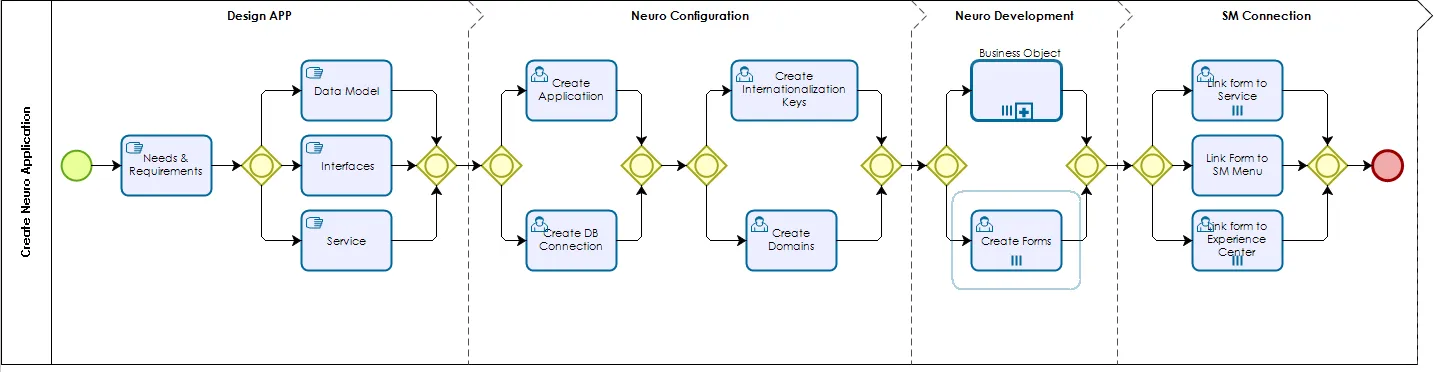
Figure 1 - Create Builder App
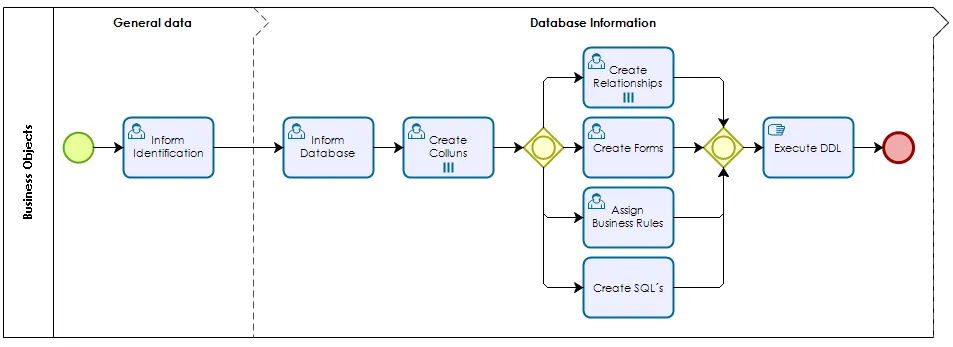
Figure 2 - Business Object
Design the Application
When creating Builder applications, it is a good practice to start with understanding business and process needs, defining application requirements, and designing the data model for all data entities that will be used.
In addition, it is important to identify all desired interfaces with 4biz elements and external systems and list all services that require automation.
Builder Configuration
After designing your application, it is time to create and configure the main Builder components:
- Create a new DATABASE CONNECTION (if you are not using a pre-existing one) and create your new BUILDER APPLICATION entry;
- Create any system-level DOMAIN for your installation should a dozen ones available not do suit your needs;
- If the labels of your application forms are to be presented in multiple languages, create any needed INTERNATIONALIZATION KEYS in addition to the ones already in Builder by default.
Builder Development
After finishing the configuration step, you are ready to start developing the application. As a general rule you need to:
- Create the BUSINESS OBJECTS, that will contain the data structure of the data entities. Here you will create database tables and the relationships among them, write customized SQL queries (if needed) and build grid templates for accessing register in the tables;
- Using the drag and drop feature, create FORMS that will provide the means to the users' input, modify and delete information in a user-friendly manner;
- If needed, create BUSINESS RULES for the validation of the information to be stored into the Business Objects.
Connect Builder
After you have your Business Objects, Forms and Business Rules created and configured you can:
- Attach Forms to Services as needed;
- Make Forms available to 4biz Experience Center or Smart Portal.