Creating and Editing a Workflow
It is possible to create workflows that best fit the users' reality, customizing the scenario of each organization.
Procedure
Access the main menu Tracker > Flow Design;
By clicking on the "New" or "Edit" button, you are taken to the creation/editing interface of the Workflow which consists of two tabs, the Flow Data tab where you will enter identification data, and the Diagram tab where you can draw the flow.
In a new flow, you will find four buttons with the functions of import, save, clear, and back. You can import a flow (previously exporting in JSON format).

In the case of the edition of an existing flow, the buttons are modified by adding the option Create Documentation and changing Import to Save.

Flow Data Tab
Flow Data is a tab for flow identification, where you can structure names for a better experience:
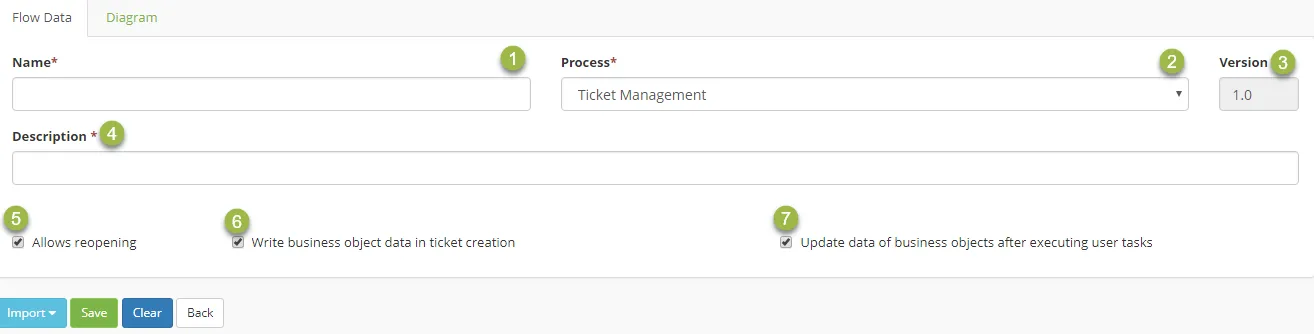
- Name – Assign a name to the flow identification so you can identify it in case of linking or assignment;
- Process – Assign to the flow one process among all those in 4biz so it is better defined and identified;
- Version – Viewer of the current version of the flow opened;
- Description – Assign a flow description for easy understanding;
- Allows reopening – Option to allow activities that are linked to this flow to be reopened regardless of group settings;
- Write business object data in ticket creation – Option that allows to create or update business object data configured in our Builder language when creating a ticket;
- Update data of business objects after executing user tasks – Option that allows updating business objects created during the execution of user tasks.
Diagram Tab
In the tab diagram, we find several Elements for the construction of the flow grouped into Events, Activities, Extensions, Gateways, Swimlanes, and Artifacts. These are several components for better construction and interaction of workflow. Below there's an example of a flow being created.
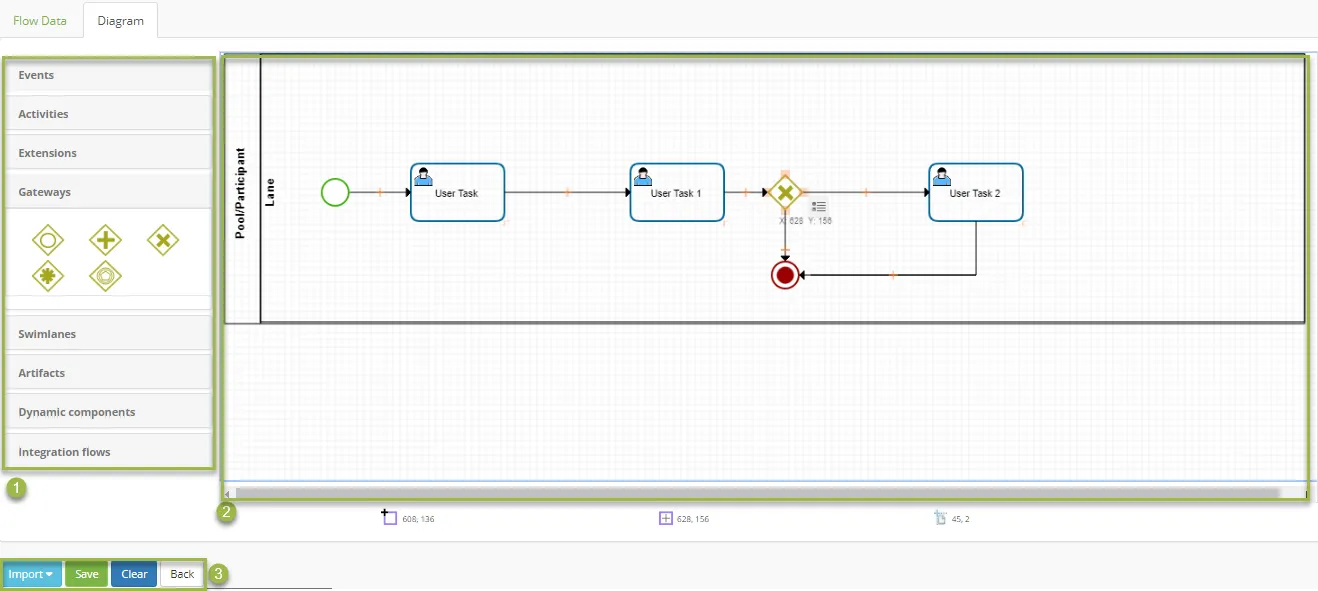
- Elements – These are sets of items/tools to be used in the flow designing as explained in the Basics Concepts item;
- Designing Area – a place for workflow design and construction;
Documentation Tab
In the Documentation tab, you will be able to generate a document with all the information of the flow designed - the description of the elements used in the workflow and the documents linked to the flow - being able to export it to PDF.