Features of Tracker
First of all, you need to familiarize yourself with the basic concepts, flow elements, business rules, and user interface. The visualization of the 4biz menu functionality depends on permissions assigned to an access profile, make sure you have this permission. If you do not have this access, an administrator can grant it.
To know if your profile has this permission, go to the top side menu on the left of the screen, and check if the first access option is the Main Menu Tracker;
Standard of the system
- Create a Workflow;
- Construct Expressions;
- Modeling of processes.
Integration Builder
- Integration Flow;
- Business Rules;
- Business Process.
🖊 Note: These items will only be available when the Builder application is enabled in your instance; If you already have this access, just click and select the Flow Design option so you can view the management screen.
Flow Management Screen
On the flow management screen, you can: Create a new flow, edit, export, and delete a flow.
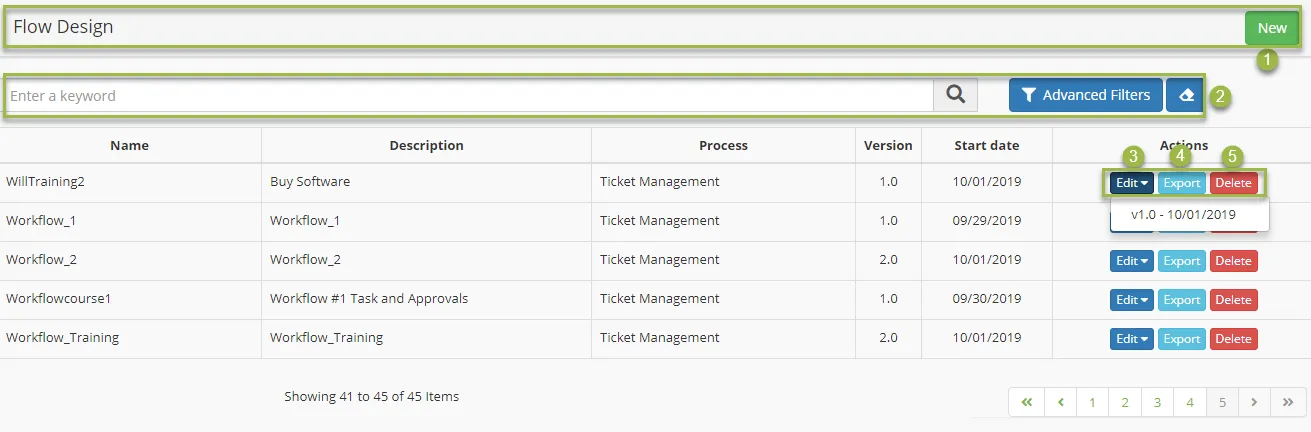
- New - click on it to start a new flow project;
- Search field - it searches for a flow by its name or part of it;
- Edit - click on it to edit a flow, being possible to choose which version you want to edit;
- Export - it creates an exportable document in JSON format;
- Delete - click on it to remove a flow;